WooCommerce Paytm Payment Gateway for WordPress

WooCommerce Paytm Payment Gateway for WordPress: Paytm is India’s largest mobile payment and commerce platform. Paytm is the wallet that helps us to transfer money instantly to anyone. Multiple Payment Solutions for WooCommerce(MPSW) Paytm checkout allows your store to accept payment via Paytm and other payment gateway.
WooCommerce Paytm Payment Gateway for WordPress
Installation of Plugin
This section describes how to install the plugin and get it working :
- Make sure you have installed the MPSW plugin and it is activated. Without MPSW this plugin would not work.
- Search for “Paytm Multiple Payment Solutions for WooCommerce ” in the WordPress Plugin directory or download it.
- Install the plugin.
- Activate The plugins through the ‘Plugins’ menu in WordPress.
Also Check: NMI Payment gateway Configuration for WooCommerce Plugin
Requirements
Paytm business account – go to Paytm.com to sign up and log in to your existing account.
Setup and configuration of Paytm Gateway on the MPSW plugin
To set up Paytm checkout :
- Go to woocommerce -> settings -> payments.
- In the payments tab go to Paytm gateway → allow customer to securely pay via Paytm and click manage.

- In the Paytm Gateway details screen, fill in the fields as given below and click Save:
Also Check Out: Cashfree Payment For Woo-commerce Plugin 2024
| Field | Description |
| Enable/Disable | Ensure that the Enable this module? the option is selected. |
| Title | Add the title that is visible to the customer during checkout. |
| Description | Enter a short description (visible to the customer during checkout.) |
| Merchant ID | Enter the merchant ID generated from the Paytm Dashboard. |
| Merchant key | Enter the merchant key generated from the Paytm Dashboard. |
| Industry type | |
| Mode of transaction | Testmode/ live mode |
| Thank you page message | Thank you page order success message when the order has been received |
| Redirecting you to pay with Paytm |
Save changes

API settings
connect a new or existing Paytm account :
- Login to your Paytm account
- click on API keys on the slide bar and click on Test API details

- you will get the test merchant Id and Test merchant key copy it from here
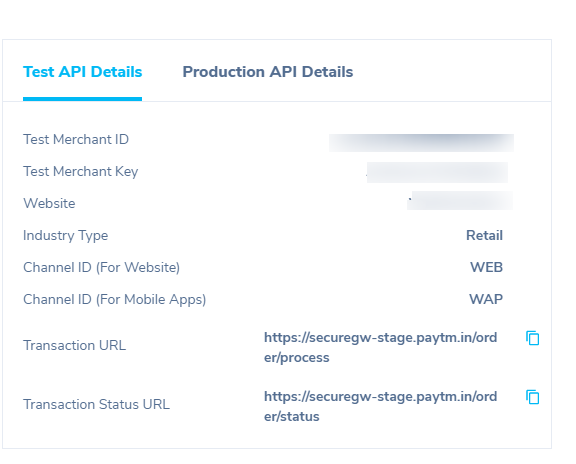
- Paste the relevant credentials into the fields on your MPSW plugin.
- Merchant Id
- Merchant Key

In this article, we told you how to use Multiple Payment Solutions for WooCommerce with the Paytm payment system using the Paytm Payment Gateway plugin. Of course, there are some other plugins but we’re pretty sure this is the best one. Please let us know if you have any questions on the topic.
[wp-faq-schema title= FAQs”]
school management