SEO-Friendly Content To Boost Your Websites Online Presence

Being said and heard many times that content is the king of SEO, we can’t deny the fact that this statement holds. But you can’t just put any content you found online and giving that content little tweaks and that’s where SEO friendly content comes into picture. SEO-friendly content is mandatory if you want to boost your content online which will eventually bring traffic to your website and that’s the whole game.

Quality is always important when producing new content, but it’s the SEO that can boost your efforts of reaching a target audience.

SEO-friendly content doesn’t have to be difficult or time-consuming, provided that you understand how on-page SEO can work alongside your content.

Here’s a small how to create content that both your audience and search engines will enjoy.

Original Content Is The Demand

original content

The key to success is originality of the content, the lesser it is plagiarized the more benefit it will give to you.

There’s no point in creating new content if it’s not authentic enough to stand out. Even if you come up with an idea from a different source, it’s still up to you to offer your unique perspective that will add value to the particular topic.

Copyscape is a plagiarism checker that can help you test your site’s content for its originality. Duplicate content, by and large, is not appreciated by search engines and it won’t help you rank higher in SERPs.

If you find it difficult to come up with new content ideas, here are 10 quick ways to find inspiration for your next topic.

Title Optimization Should Be Checked

Your headline is among the first things that users will come across when carrying out a search. This makes them important, and it’s useful to brainstorm as many variations as you can until you land on the best candidate.

Using your focus keyword in the headline can also be a good idea, but don’t try too hard to include it. Use power words and avoid redundancy to create a clear and appealing result. Aim for a headline of 55-60 characters, as this is what Google will display on the SERP.

Also, make sure that your URL is relevant to the title, rather than a sequence of numbers that only makes it more complicated.

Structure Your Content
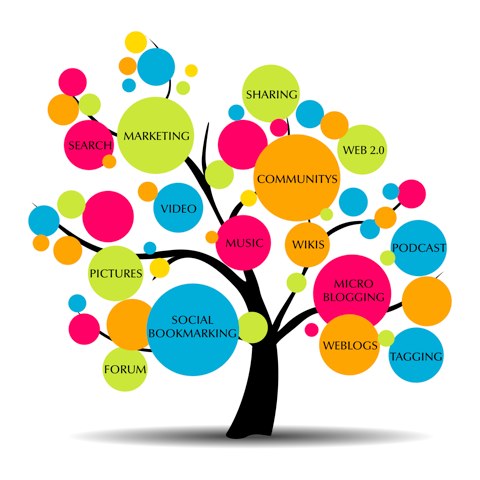
structured content

It’s not just the content, but also its structure, that helps search engines decide on the results they’ll display first. Thus, a clear structure with headings and paragraphs that facilitate reading are preferred both from a user perspective and also from a search perspective.

Headings also help search engines get a quick overview of your content, which is why it can be beneficial to feature your focus keyword at least once.

Whether you follow the structure of H1 to H6, or simply add H2 and H3 headings at relevant points throughout the text, consistent structure in your pieces of content is appreciated.

Stuff Keywords

Keywords are less often used nowadays as the first signal to indicate what your post is about, but they are still helpful to offer an overview of the topic you’re focusing on.

Keyword research is still useful when trying to decide on the most interesting topics for your audience. Keywords can still be part of your content, provided that they are added in context and at the right balance. There’s no need to sacrifice the quality of your content to include more keywords, as keyword stuffing can lead to the opposite of the result you want.

Readability Is The Aim

The readability of your content has to do with the simplicity of its language, the lack of grammatical or syntactical errors, and the sentence structure.

Online readability tests allow you to learn the “reading age” someone needs to understand your content, and they depend on:

  • sentence length
  • number of syllables per words
  • frequency of passive voice

Despite the different readability formulas, you can still gain valuable insights on your writing that become even more useful if you want to target a wide audience.

Is your content suitable for the audience you want to target?

Include Links (External And Internal)

Internal links can help you prove your authority in a particular field by creating a logical sequence from one post to the other. This may lead to a series of posts that offer additional value, making it easier for search engines to understand your key topics.

External, or outbound, links indicate that you are well aware of the topics you’re writing about, to the extent that you’re ready to use further sources to support your content. It’s more useful to link to reputable sources, as these links have bigger credibility.

Beware, excessive linking, either internal or external can lead to the exact opposite results. Make sure that every link serves its own purpose in your content.

Optimize All Your Images

optimize your images properly

The optimization of your images provides an additional opportunity to show up in search results, this time in image search.

As visual content becomes more and more prominent, it cannot be left out of SEO. Luckily it’s not time-consuming to optimize your images. All you have to do is keep in mind a few simple tips:

  • Always keep the file name relevant
  • Be careful with the file sizes, as they affect the page speed
  • Don’t forget to add alt text, or else a title for your image
  • Think like a user when naming your images
  • Focus on quality images and avoid generic ones

User Is Primary

Every piece of content should have the user in mind. This also applies to SEO. You can’t create your next piece of content, or carry out keyword research, without knowing your audience.

What does your audience expect from you?

How can you enhance the user experience?

Does your site sabotage your content?

All the questions above can be answered by paying closer attention to your site, your content, and your target audience. Google rewards pages that focus on user experience, so never underestimate the power of the user.

Some Tips To Finish Up

If you want to create SEO-friendly content, here’s what you need to remember:

  • Focus on user intent
  • Be authentic
  • Come up with the best headlines for your content
  • Pay attention to the content’s structure
  • Use keywords wisely
  • Edit, proofread and aim for readability
  • Use both internal and external links to add further value
  • Optimize all your images to gain new opportunities for search ranking.


SEO-Friendly Content is the need of the hour and it should be implemented well to make sure that you are up to the mark of whatever you are doing and you are not lacking behind in any aspect.

Hope you have enjoyed this blog post and our other blogs as well.
In case if you have missed reading, go through Top 10 Most Illustrated Web Designs or Top 10 Ways To Get More Views On YouTube Videos.

Most Common Web Design Mistakes – Coffin For A Website is a monstrous dream for any web designer.

Gamify Your Website For Better User Interaction

User interaction and retention is one tough job webmasters, site owners, bloggers and marketers has to face. To make all things work properly, you have to think out of the box and to adopt or invent new ways of gathering traffic to your website and then make them stick to your website for any reason. In order to make all these things happen, gamifying your website is also a good option. While not new in the market, gamifying any website is still one the best tricks to capture and hold your website traffic. So, are you in to gamify your website?

According to a report released by the Entertainment Software Association in 2015, 42% of people living in the U.S. play video games at least three hours every week. Michael D. Gallagher, the president and CEO of ESA, added that:

Video games are ingrained in our culture. Driven by some of the most innovative minds in the tech sector, our industry’s unprecedented leaps in software and hardware engages and inspires our diverse global audience.

OK, so it’s important to take note of that statistic since it means that nearly half of all people are already well-acquainted with gameplay. If you drill down even further into the ESA’s research, you’ll find more information on who exactly these game players are. For example, the average gamer’s age is 35 and there’s a fairly even split between the sexes (56% male, 44% female).

How To Gamify Your Website?

Gamification can be fun, educational, drive loyalty, boost brand recognition, and do a whole lot more for a WordPress website. It’s just important not to overdo it. Gamification needs to be memorable for the value it adds, and not just because you created a diversion someone can use for a couple minutes before getting back to work.

With that said, let’s talk about some practical ways you can add gamification features to your own website.

1. Communities

One of the benefits in playing videos games is the opportunity to meet like-minded individuals as they explore the same landscape and universe as you. Some games even allow you to join forces and form your own virtual team, despite never having met one another in real life. If your website has a large community that would benefit from collaboration and communication, forming a membership service and community would be a great way to encourage that same team-like atmosphere.

If you’re interested in creating a community, check out BuddyPress, a free social networking plugin for WordPress.

2. Page Loading Progress Bars

With the right animation, you can keep visitors engaged as they wait for a page to load. Those same type of transitional animations work really well for gamification. Obviously, no one wants to sit and wait for a game (or website) to buffer, but with a short and entertaining enough animation, you may increase the likelihood that visitors stick around longer.


3. Points-Based Features

Further building on that idea of creating a community, if you want to take it an extra step and reward members with points, you can use a plugin like myCRED to do so. For the most part, this plugin focuses on helping users devise points systems and manage visitors’ points accumulation on their WordPress website. Purchase rewards, badges, games, and other related features are available through this tool as well.

4. Tooltips

Most video games will usually give you a quick overview of how to use the controller in order to navigate your way through the game. Think of tooltips in the same way. While your goal should always be to create an intuitive pathway from entry to conversion, sometimes it’s helpful to add quick tips to keep your visitors moving along.

5. Membership Rewards

Now, if what you’re looking for is a wholly comprehensive membership rewards gamification tool, then Captain Up is what you’ll want. This tool comes chock-full of gamification features like badges, levels, trophies, points, currencies, and rewards. You can also use this to manage communication with your community and to promote and reward visitors for engaging with your brand on social media.

6. Quizzes

Want to follow in the footsteps of websites like BuzzFeed and provide visitors with additional entertainment or educational value? Create quizzes, polls, and surveys to keep them engaged and give you an opportunity to gain additional insights about what more they’d like to see from you. Check out Opinion Stage’s 4-in-1 plugin solution for this.

Top Reasons To Use CDN For Your Website

Making your site load faster is one top most important aspect of SEO and internet. According to a study, if your website doesn’t open in 3 seconds, majority of your users leave your website without even taking a look and that’s harsh and tough at the same time for a person who has spent a lot of time and care in building his/her website and than users going away without a glimpse of the website. And to sort this one out, we are going to talk about top reasons to use CDN for your website.

But before proceeding with the reasons, lets know what CDN actually is and how it works?

What is CDN?

Content Delivery Networks (CDN) are the transparent backbone of the Internet in charge of content delivery. Whether we know it or not, every one of us interacts with CDNs on a daily basis; when reading articles on news sites, shopping online, watching YouTube videos or perusing social media feeds.

No matter what you do, or what type of content you consume, chances are that you’ll find CDNs behind every character of text, every image pixel and every movie frame that gets delivered to your PC and mobile browser.

CDN’s are designed to remove Latency, it’s the annoying delay that occurs from the moment you request to load a web page to the moment its content actually appears onscreen.

How CDN works?

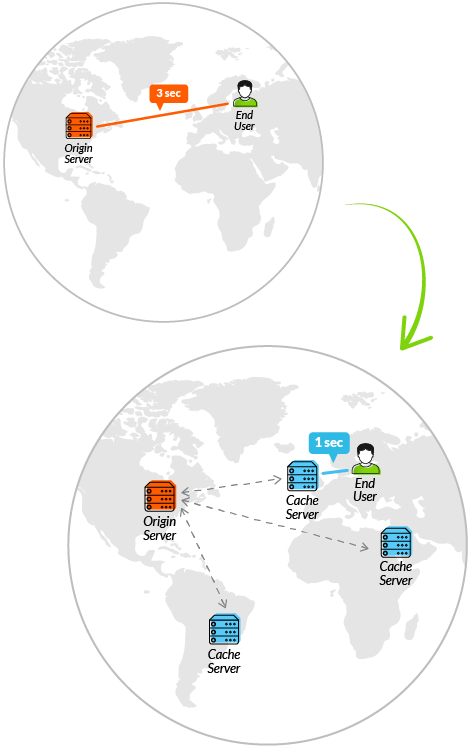
To minimize the distance between the visitors and your website’s server, a CDN stores a cached version of its content in multiple geographical locations (a.k.a., points of presence, or PoPs). Each PoP contains a number of caching servers responsible for content delivery to visitors within its proximity.

In essence, CDN puts your content in many places at once, providing superior coverage to your users. For example, when someone in London accesses your US-hosted website, it is done through a local UK PoP. This is much quicker than having the visitor’s requests, and your responses, travel the full width of the Atlantic and back.understanding Content Delivery Network better

This is how a CDN works in a nutshell. Of course, as we thought we needed an entire guide to explain the inner workings of content delivery networks, the rabbit hole goes deeper.

Since, now we have a slightest idea of what CDN is and how it works, lets take a look at,

Top Reasons To Use CDN For Your Website

Performance

What does performance mean? It means connected content delivered at speed. It’s the difference between a click giving you immediate access to new content, and a click then a 7 second wait while a page loads or a video buffers.

How does it work? When requested content is cached (pre-saved) by a CDN’s servers, end users will get that content by connecting to the nearest CDN server rather than waiting for their request to go directly to the origin. This results in a significant performance improvement for the end user. For example, let’s say that Fashion House X (FHX) from Milan, Italy, releases its new line-up for online orders. Fashion lovers in New York, Paris, Rio De Janeiro, and Tokyo all go online to make their orders. If FHX isn’t using a cloud content management system, the request from each end user must go all the way to Milan and back. However, if FHX uses a CDN and has pre-warmed its content across the CDN, each user can access the new content from servers directly in their city, saving their data hundreds or thousands of miles in round-trip time.

What if the content isn’t already in cache? When a CDN server does not have the content in its cache, it is able to traverse the length and breadth of the Internet using its programmed knowledge of the inter-connections between itself and its companion CDN servers. This helps it overcome the challenges of peering between multiple ISPs, lost packets due to network outages, and the time lost in DNS resolution. Advanced CDNs also have other specific technologies to deal with dynamic, or uncacheable, content.

All of this means that via a CDN, content providers can deliver fast, quality web experiences to all their end users; no matter what location, browser, device, or network they’re connecting from. Webpages render faster, video buffering time is reduced, users stay more engaged, and content providers get more business!

Availability

Availability means that content remains accessible to end users under high-stress situations such as excessive user traffic, intermittent spikes, and potential server outages.

When traffic loads peak at millions of requests per second, even the most powerful origin servers would be put to the test. Without a CDN, all this traffic has to be absorbed by a content provider’s origin infrastructure. This can cause the origin to fail, resulting in a terrible end user experience and lost business. That’s when CDNs, with their massively distributed server infrastructure, are of immense value. Advanced CDNs, with their highly distributed architecture and massive server platforms can absorb tens of TBps of traffic and make it possible for content providers to stay available to larger user bases than otherwise possible.

As an example, let’s return to Fashion House X (FHX) in Milan. FHX’s brand is beloved by millions of fashion lovers, and their new line-up generates a lot of excitement. At the moment of launch, fashion lovers from all over the world go online to FHX’s website at the same moment. If FHX is not using a CDN, all of those users would hit their origin server at the same time, causing it to fail. However, if FHX is using a CDN, all of that traffic will be served across the CDN’s hundreds of thousands of servers, keeping FHX’s origin from failing and delivering a quality experience to fashion lovers across the globe.

Security

As the volume of high-value data and transactions on the Internet continues to grow, so do the forces of attackers looking to exploit it – and these forces are costing organizations big money. According to a report by the Ponemon Institute of Cyber Crime, in 2015 businesses around the world suffered average losses of $7.7 million due to cybercrime. Along with crimes committed by malicious insiders, DDoS and web-based attacks were found to be the costliest.

According to a Report, the number of both DDoS attacks and web-based exploits (SQL injection, cross-site scripting, and local or remote file-inclusion attacks) are becoming more common as well. These attacks are also increasingly launched in conjunction using a DDoS to divert attention while causing more serious damage with other exploits. In both types of attacks, it is often difficult to distinguish bad traffic from legitimate traffic, and strategies continue to evolve rapidly over time, requiring significant dedicated security resources in order to stay up to date on mitigation strategies.

Given the increasing volatility of the Internet threat landscape, helping to secure websites is a critical CDN requirement. Today’s most advanced CDNs have made information security a core competency, providing unique cloud-based solutions. CDNs should protect content providers and users by mitigating against a wide array of attacks without malicious entities ever compromising delivery and availability.

Intelligence

As carriers of nearly half of the world’s Internet traffic, CDN providers generate vast amounts of data about end user connectivity, device types, and browsing experiences across the globe. They can expose this data to their customers, thus giving them critical, actionable insights, and intelligence into their user base.Tthis includes Real-User Monitoring and Media Analytics to measure end-user engagement with web content, and Cloud Security Intelligence to keep track of online threats.

Wrapping Up

CDN’s certainly is the solution to high pings and latency’s people are facing while accessing the web and putting CDN in use will make your site load faster and give your user a mesmerizing web experience.Now, choosing a better CDN system is the real challenge because there are a lot of companies out in the market promising something else and reality is quite different. So, we’ll recommend you to choose wisely out of all the available options.

Here’s a list of all free CDN’s which promises up to the mark service quality.

Hope you have enjoyed this blog post and our other blogs as well.
In case if you have missed reading, go through Top 10 Most Illustrated Web Designs or Top 10 Ways To Get More Views On YouTube Videos.

Most Common Web Design Mistakes – Coffin For A Website is a monstrous dream for any web designer.
Migrating From HTTP To HTTPS – Infographics

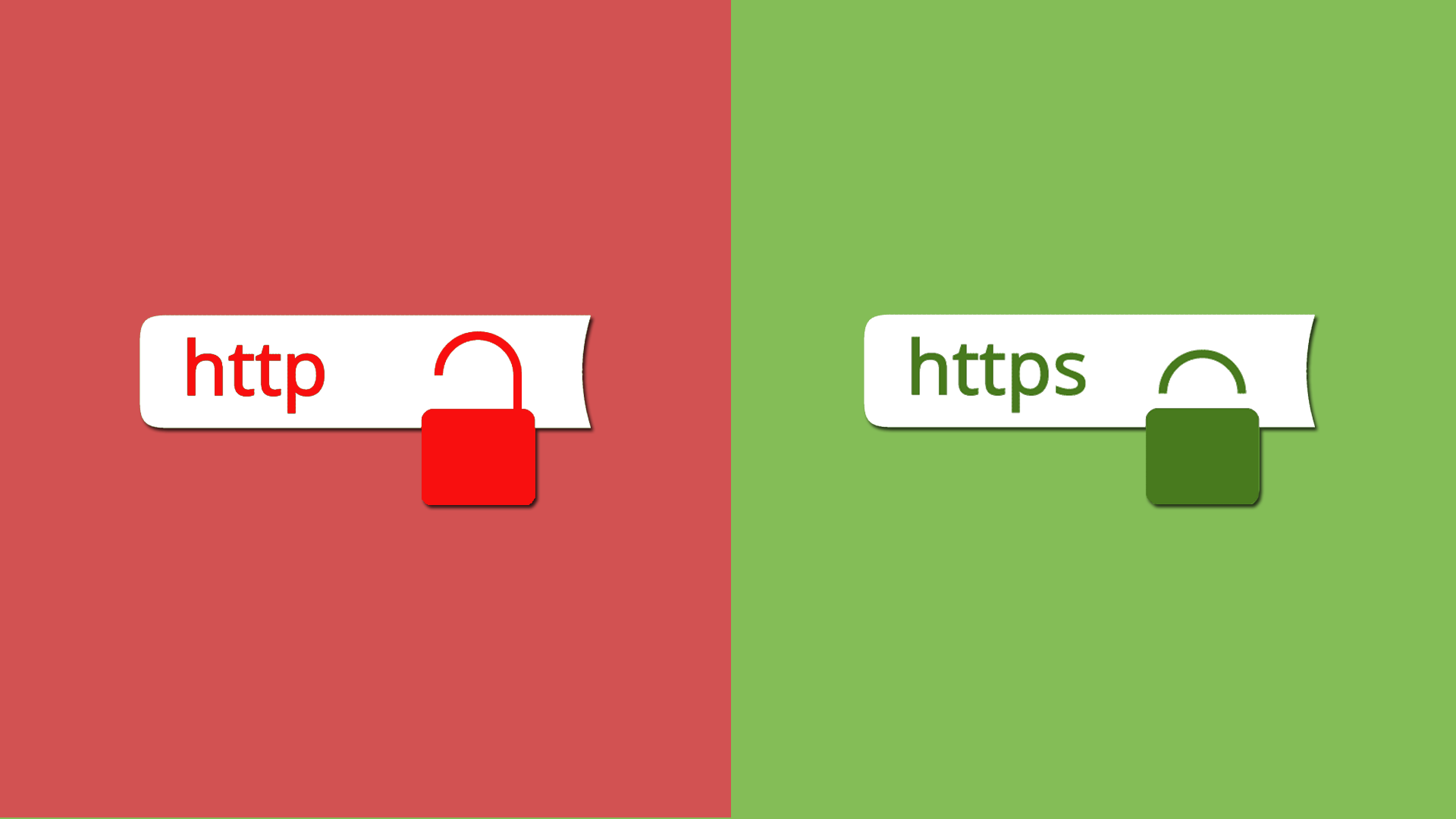
Internet these days is little less secured due to easy availability of knowledge, everybody has the key to break into your less secured website and do their little tricks to show off. Everybody from consumer to companies requires more secured channel or platform to build their website for the sake of the security of their users and their own-self. HTTP (Hyper Text Transfer Protocol)  wasn’t that secured and anyone with some extra knowledge can do the damage to your website or your data. Therefore to make web more safer, people are migrating from HTTP to HTTPS (Hyper Text Transfer Protocol Secure) and trust me that secure isn’t just a word in HTTPS.

HTTPS keeps your data more secured by encrypting the data of your website or personal information of your client such as BANK CARD DETAILS or NAME or ADDRESS for that instance is encrypted into a special segment of codes and digits so it is almost impossible for the notorious brains out there to play around with your data.
Migrating from HTTP to HTTPS isn’t that hard nor it requires knowledge of heavy coding stuff. It can be purchased from your domain/hosting provider and can be easily installed into your website.

Lets learn it with the help of an amazing infographic provided by Matt Banner on one of his posts on ONBLASTBLOG.COM.


Here’s what we’re covering in this INFOGRAPHIC:

  • How to Switch from HTTP to HTTPS [Infographic]
  • Ultimate Security with HTTPS: Why You Should Migrate Your Site
  • How to Safeguard Your WordPress Site [Infographic]
  • The Current State of WordPress Security
  • 17 Steps You can Take Today to Improve Your WordPress Security

http to https migration

Phew! that’s one great infographic made by Matt.

I hope you have enjoyed learning migrating from http to https, we have some more for you Most Common Web Design Mistakes – Coffin For A Website and Top 10 Ways To Find Topics For Your Blog Those Are In Trend

Joomla vs Drupal- An Intuitive Report

Content Management Systems (CMS) are being liked by many because of the simple use and drag and drop options it provides. The best websites today are powered by easy to use CMS that allow you to make changes to a website without needing to touch a single line of code. And that’s the reason why many CMS came into the market with some great building options but only a few of them survived. In this blog post, we are going to take down some factors that differentiate two of the major CMS in the market Joomla vs Drupal.

If you want to get a new, powerful website online, but can’t wait around or shell out the big bucks ($3k+) required for a custom site, look no further than these three options.

Joomla and Drupal both offer great features, tons of customization, ease-of-use, and strong security.

And yes, they both are free.

Choosing the right one can be difficult because they both are good options.

But chances are, one of these two will fit your requirements the best (whether it’s making a simple business website or running a social networking site with several functions).

Let’s see how they compare to find the perfect choice for you.

Quick Seek:

  • Joomla – Great for e-commerce or social networking websites, but requires a basic understanding of technical skills.
  • Drupal – The most difficult, but also the most powerful. It requires a familiar understanding of HTML, CSS and PHP.

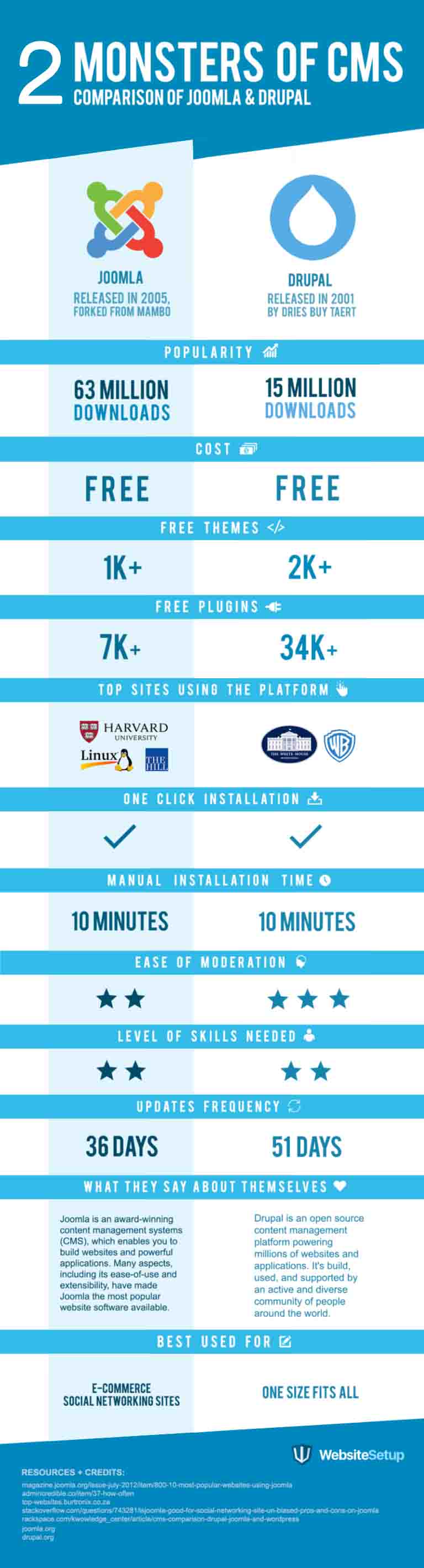
Joomla vs Drupal Comparison Chart

drupal-vs-joomla-comparison-chart

Choose which one suits your needs better, Let’s move to our in-depth review.


Drupal (More Robust & Complex)


Drupal is the third most popular content management system available today, used by sites both large and small.

It’s among the most powerful open sourced options available, which means it’s learning curve is also a bit steeper.

Here’s where Drupal excels:

  • Technically Advanced – Drupal is the most technically advanced of these three content management systems. Good for technical people who like to get their hands dirty.
  • Improved Performance – Drupal pages typically load more quickly, and have faster response times than those made with WordPress or Joomla. Part of the reason is because it’s less resource-intensive, requiring a less expensive server or hosting setup. (However like with all CMS, adding too many third party plugins can bog down performance.)
  • Customizable – Drupal is easy to customize with many widely available plug-ins, themes and other configurable options to choose from. You can also edit the root files directly, perfect for those developers who need to make more significant changes.
  • Free – You can download the Drupal software for free, and install it on your own hosting server. If you don’t which host to use, use this best web hosting chart.

Drupal is the most powerful content management system out of the box. But with that power comes some additional difficulties for the website owner.

Anyone considering Drupal should have at least a basic knowledge of HTML, PHP and other common web programming languages. You don’t need to be an expert necessarily, but being able to troubleshoot error messages and identify code problems will be a HUGE benefit.

If your website begins to gain traction, evolving beyond a simple business site or site, you’ll need to have (or hire) technical expertise to make sure it continues to run smoothly.

Which can be a bit of a problem, because it’s typically a little harder (and more expensive) to find someone with advanced knowledge of Drupal’s steep learning curve. Whereas it should be much easier and less expensive to find someone relatively tech-savvy to help you make basic WordPress updates.

Also, unlike WordPress.com, there is no option to have a website hosted by Drupal themselves. That means purchasing your own domain and hosting is required before getting started with a new Drupal site.


Joomla (Somewhere Between WordPress & Drupal)


Joomla is the second most popular CMS. It’s like the compromise between WordPress and Drupal.

It’s powerful enough to run most websites without any problems, and it doesn’t require the same level of technical experience to run as Drupal either.

As the second most used CMS (behind WordPress), Joomla also has a lot of plug-ins and themes available to choose from (around 6000 or so) similar to both WordPress and Drupal. So customizing the look and feel of your site shouldn’t be a problem.

Here are a few more reasons Joomla might be ideal for you:

  • Social Networking – Joomla makes creating social networks of all three options. Social networks can be a powerful asset for many sites, and with Joomla, you can have one up and running extremely quickly and easily.
  • Commerce Sites – Joomla also makes setting up an online store quick and painless. You can setup eCommerce shops with both Drupal and WordPress, but it tends to require more effort and special customizations.
  • Not too Technical – Joomla has found the middle ground between the ease of managing a WordPress website and the power of a Drupal site. The good news is that most non-tech savvy people should be able to run a great Joomla site without needing any technical support.
  • Help Portal – Joomla offers a great help portal for asking questions and getting technical support. It’s not fast or extensive as WordPress’ community-based support pages but is definitely quicker (and cheaper) than Drupal’s technical support options.
  • Free – Like both WordPress and Drupal, Joomla is another free option to use on your own web servers. However similar to Drupal, there is no option to have it hosted for free like WordPress offers.

Joomla users love that their websites can do or be almost anything, without sacrificing ease-of-use. Joomla has brilliantly combined the power and flexibility Drupal has to offer, while also retaining the intuitive, user-friendliness that WordPress excels at, making it a perfect middle ground in a crowded marketplace.


What’s Your Choice?

Everyone will say their content management system is the best. Both are excellent choices in most cases.

But your own unique scenario will require different capabilities, which probably makes ONE of these two CMS options the perfect fit.

If you have high hopes from day one that your site will grow significantly, requiring extensive features and unlimited customization’s, take the plunge with Drupal.

Undecided whether to go with making a simple blog site or an extended featureless more extensive website for, or need something unique like a social network or eCommerce site, Joomla might be the best bet.

Both the platforms are free.

Each offers a variety of helpful third-party tools to add unique features to your site.

And you’ll find readily available technical support with each one (although Drupal’s might be among the most expensive).

Wrapping Up:

Whether it is Joomla or Drupal, they both has a variety of features and being used by many according to their use. Now, it’s up to you whether you want some complex heavy set of a website or some not so complex simple and easily customizable website. Both has their cons and pros depending on what purpose they are being used for. Choose for yourself!

And to extend the knowledge bank, you can also read WordPress vs. Medium – Which Is The Better Choice and How To Improve SEO In 2017.

And of course, how can we forget WordPress in 2017 – Trends To Be Followed

Artificial Intelligence Transformed SEO

On October 2015,  Google confirmed using Rankbrain (a search engine algorithm that was powered by an AI) for their search engine. Search experience for a common user changed very much after that, and it became more difficult for SEO experts to work and to rank their clients site on top and that’s how artificial intelligence transformed SEO.

It even became difficult for companies to rank their own products on their search engines,

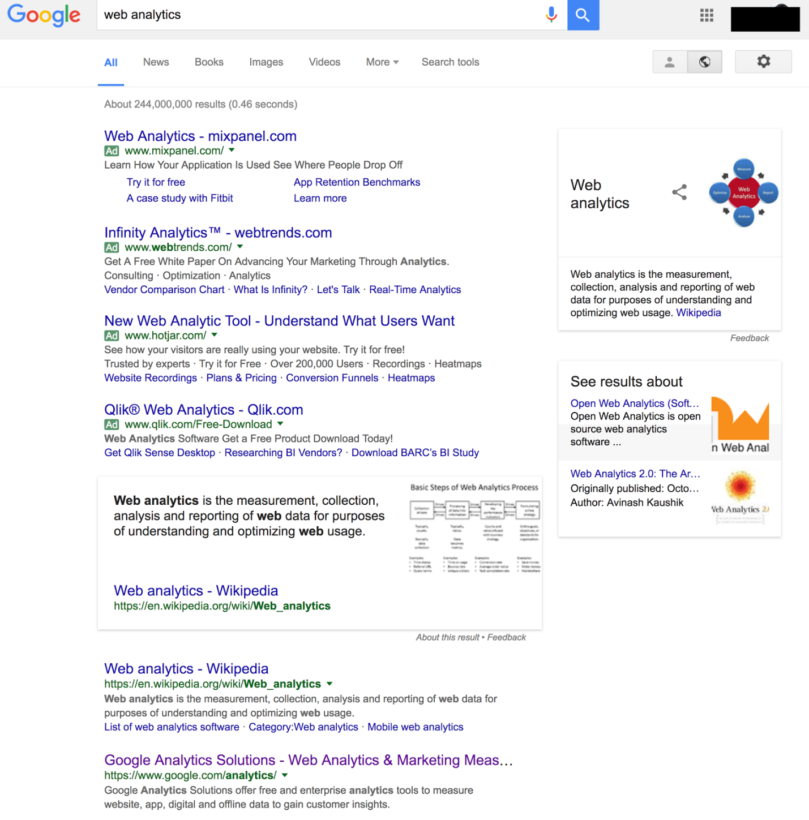
web-analytics-artificial-intelligence-transformed-seo

Look how below Google Analytics is ranking when we searched for web analytics on Google Search.

Lets us look at another example,

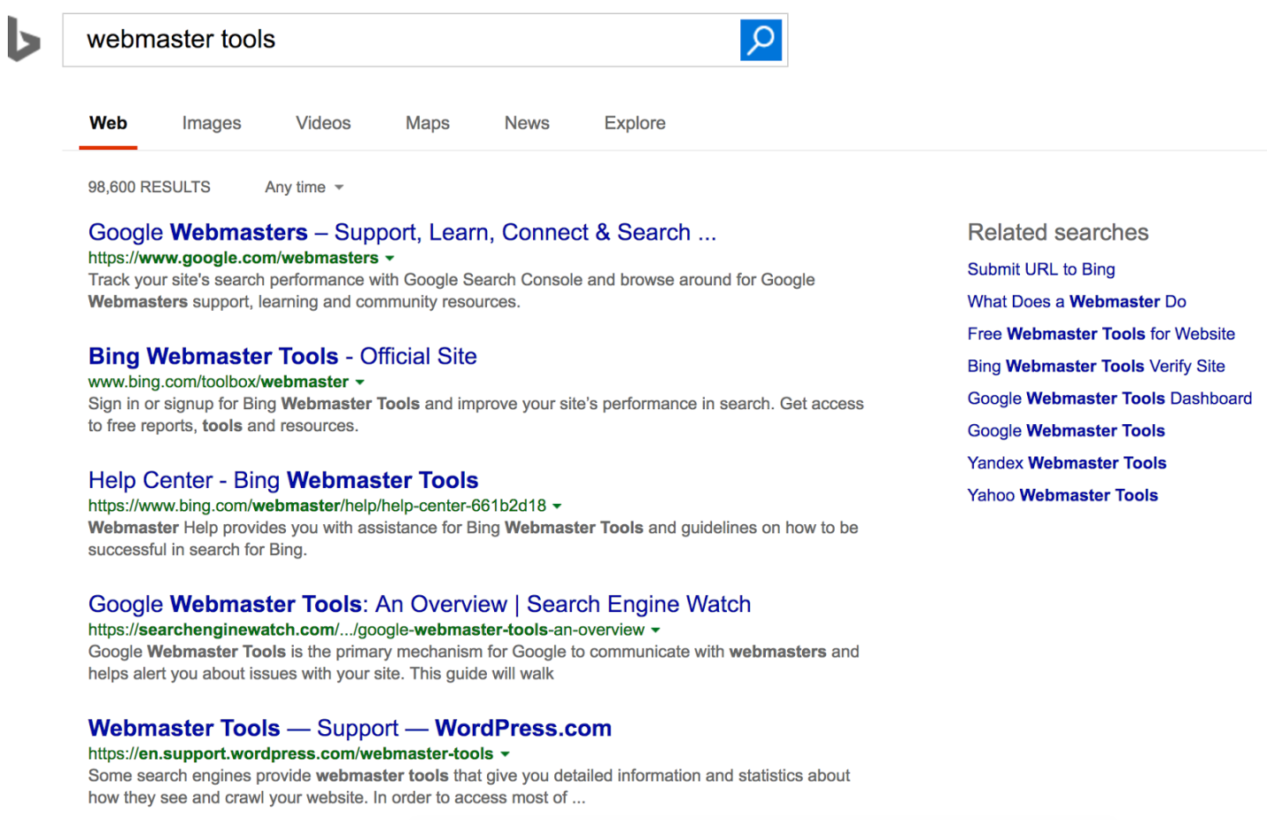
bing-analytics-artificial-intelligence-transformed-seo

So, this is how Bing is reacting when searched for webmaster tools, beating google webmaster in the rankings has became tough for bing analytics on Bing Search.

There are generally three different classifications of artificial intelligence:

  1. Artificial Narrow Intelligence (ANI): This is like AI for one particular thing (e.g. beating the world champion in chess).
  2. Artificial General Intelligence (AGI): This is when the AI can perform all things. Once an AI can perform like a human, we consider it AGI.
  3. Artificial Superintelligence (ASI): AI on a much higher level for all things (e.g. beyond the capabilities of a single human).

So how to tackle Artificial Intelligence Transformed SEO?

Knowing that Artificial Intelligence is shifting the search engine marketers world is one thing. Knowing what to do about it is another. So here’s what to do to beat (or win at) Artificial Intelligence and search rankings.

Keywords Need to Be Analyzed Independently

In the past, when there was a big change in rankings, analysts would evaluate which types of websites were affected and then declare that Google’s latest algorithm change was due to content quality, backlink profiles, or whatever else. But thanks to RankBrain, these generic SEO declarations are no longer accurate. Why? Because RankBrain uses a different combination of core algorithms depending on each specific query. For one keyword, RankBrain might decide the META title is the most important clue to pay attention to, while another query may call for more emphasis on backlinks. Therefore, ranking factor analysis now requires you to review only the history for keyword-specific searches.

Niche Sites Are the Key to Correct Classification

Another impressive ability of RankBrain is to evaluate which sites are considered good and bad within a specific industry. The artificial intelligence studies the layout, settings, features, content, etc. for each industry and essentially makes the good sites a template in which to compare all other sites in that vertical. For example, it knows that WebMd is a reputable site in the health industry, so when it detects a site similarly laid out with similar keywords, it may assume that that site is also high quality.

What this means for you is that you need to study and try to emulate (in your unique way) the sites that are highly regarded in your industry. This also means that generic sites can be easily misclassified. If it’s not clear to RankBrain what your site is about, it might associate you with a spammy site in one industry instead of a high-quality one in another. To avoid this, keep your site niche.

Backlink Profiles Are Being Automatically Classified

Just like RankBrain is creating layout templates within industries, it is also evaluating the backlink profiles. The artificial intelligence algorithm evaluates what other sites the company is receiving backlinks from, so it considers links from these sources as good-quality links. For example, let’s say it has determined a high-ranking website that sells shoes receives backlinks from sites about sports, fashion, and even health. It determines that this is that industry’s linking neighborhood.

So now let’s say you also have a shoe ecommerce website and you want to improve its SEO. Luckily, you have a friend in the auto industry who is willing to give you some backlinks. But when RankBrain evaluates your site and sees these links, it will realize that other reputable shoe sites don’t have links from auto sites, and it will assume your links are spammy. Yes, even if you went about it the correct way and they are, in fact, perfectly legit. So even if you do have connections outside of your related industries, skip the backlinks. It could do more harm than good now that artificial intelligence is involved.

Artificial intelligence is continually changing SEO. While some aspects are great, some can make it more challenging. Essentially, there are no more loopholes. If you do things the correct way, paying attention to the high-ranking sites in your industry, you have nothing to worry about.

Rounding Up :

In a nut-shell, employing the SEO practices that are a class apart you can change the optimization of the search engines to reap nothing but the best out of the Google’s ANI RankBrain algorithm to boost website rankings for a satisfied client experience.

Don’t forget to read How To Use Social SEO To Increase Website Ranking and How To Improve SEO In 2017.

And of course how can we forget WordPress in 2017 – Trends To Be Followed

Top 10 Ways To Get More Views On YouTube Videos

Everyone is obsessed by the biggest video sharing platform YouTube and fewer of them knows the original strength of YouTube as far as marketing your business is concerned. There are fewer ways to get more views on YouTube videos and we are going to talk about them in this blog post.

With over a billion unique YouTube visitors per month, there is a large potential audience for every uploaded video. Whether it’s a video of someone performing a prank or a video for some product launch or promotion, YouTube is the go-to platform for video consumption or to get more views on YouTube videos..

With a whole new lot of YouTube stars on the rise, it is definitely a platform to be considered by everyone looking for some online marketing and publicity.

How To Get More Views On YouTube Videos?

#1 Look Out For Engaging Content

It should go without saying, but you need to create content that is engaging, informative, and entertaining. Make sure it stays that way for the entire duration of the video. Losing the hook in the middle will cost you a lot of viewers.

Content that works the best is content that is either entertaining or informative. The content that really works the best is content that is entertaining AND informative. This is pretty standard with any kind of content marketing, but in particular, videos that inform and entertain are usually the most successful.

Specifically, you should be uploading a combination of burst and evergreen videos. Burst videos will be all the rage for a limited time, getting you instant hits, but will fade away as time passes by.

Evergreen videos are the ones that will get you archived views and will remain relevant irrespective of time. Ideally, if possible, you should try to create mostly evergreen content.

If you fear the wrath of the camera, you can try publishing ‘Screencasts‘. You can still make screencasts entertaining and informative.

Whatever you do, before you hit the publish button, make sure your videos are highly engaging and will be of value to your audience to get more views on YouTube videos.

#2 Upload More Frequent

Now this is easier said than done, but you cannot ignore its validity. The main reason someone subscribes to a channel is because they love the work of the publisher and wants to see more of their videos.

YouTube subscribers usually do not like channels that don’t produce regular content. Especially in today’s digital age, consumers want continually more and more entertainment. You need to be able to keep up with your subscribers’ demands to get more views on YouTube videos.

Consistency is the key to developing a long-lasting relationship with your subscribers.

Release your videos in a timely, recurring, and structured fashion. Try to publish one video per week… or at least one or two per month.

Stick to your schedule and do not upload videos off of this schedule. This will hurt your reputation. It’s like watching your favorite TV series; a new episode comes out according to a regular schedule. This consistency helps you stay engaged as a viewer and get more views on YouTube videos.

#3 Set No To More Than 5 Minute Video

Although YouTube is home to many detailed, in-depth reviews and other such lengthy content, the high converting videos are the ones which are optimized for less than 5 minutes in length.

Comscore reported in January 2014 that the average length of most YouTube videos was around 4.4 minutes. For content creators who are getting started, this is the golden number.

Follow this number until a following is built.

Once you have a good following, you can experiment with video length and see what your audience’s reaction is.

Keep it short, simple, informative, entertaining, and under 5 minutes.

It is a tough challenge, but it’s worth your efforts.

#4 Use Intro And Outro For Your Video

Your YouTube intro and outro not only helps in branding, it will make your video more entertaining.

Having an intro and outro will serve your brand and offer your video a sense of professionalism. It’s like the opening theme song of a TV show.

Moreover, an attractive intro will ensure that your viewers stay glued to the rest of the video.

#5 Optimized Video Descriptions

Coming back to the SEO aspect of YouTube videos, the video description is not to be neglected.

The description will not only let your videos be found in search engines, they’ll also give potential viewers an idea of what your video is about.

But don’t overdo it. Having a very detailed description makes no sense because only the first few lines of your description show up when the video is initially loaded.

Again, like the title, you should use your keyword in the description, and again, don’t overdo it. Don’t think you’re outsmarting the search engine by adding in your keyword 17 times. Doing this will actually hurt your chances of showing up in searches.

Keep it natural and authentic.

#6 Make Proper Use Of Annotations

‘Call to action’ annotations are those annoying popups in the video (which can be a blessing for the YouTube creators). If used in a proper way, you can get more subscribers by making your visitors click them during the video.

Many YouTubers have reported increased channel subscriptions with these annotations added to their videos.

A simple link created for subscribing to the channel can be placed as a call to action in your video.

If you’re using a graphic to add a call to action, you can liven it up with a call to action annotation.

If done in an unobtrusive way, you will see your channel subscriptions grow. 

But again, the key here is not to be annoying. Users will not subscribe if your only reason for making videos is to get more people to subscribe.

Do it smartly, and it will pay off.

#7 Finish Off In Style

Whatever the nature of your videos, make sure you end your videos on a high note.

Just like the last dialogue before the curtain falls, make sure you end your videos in a memorable fashion.

Ask your audience for a subscription and a like if they liked the video. Tell them to check out your website. Give them your phone number and ask them to call you (…Certainly that’s not recommended).

Whatever you do, remember:

  • If you never ask, the answer will always be no.

End your videos on a note of confidence and let your audience know that you appreciate their viewership.

Create a tail slate, or a brand-like outro with a standard banner and “subscribe” annotations across all of your videos.

End your videos with a smile and keep your visitors eager for more to get more views on youtube videos.

#8 Never Sail On YouTube Boat Alone

Collaborating on YouTube has become pretty common recently among top content creators.

Why?

Because collaboration benefits everyone.

It’ll be good for you, for your collaborators, and for the audience.

The creative process is a constructive one, and seeing other YouTubers as your competitors will only impede your progress, leaving you languishing and loathing others’ successes.

Try to reach out to similar users in your field and ask them out for an opportunity to work together on something interesting.

You’ll be able to connect to a new audience, your collaborator will be able to connect to a new audience, and your viewers will love all of this extra value they’re getting.

It’s a win-win-win.

#9 Award Your Subscribers With Some Freebies Or Unique Stuff

Who doesn’t love giveaways?

Offer your audience something in return for all of their engagement on your YouTube channel.

A free giveaway or video contest will reward your current followers, and will help lure in new followers.

You can give away anything you want:

  • A new tech gadget.
  • A branded t-shirt.
  • A hosting subscription.
  • A new car…!

Whatever it is, your audience will love the chance at getting something for free, and they will tell all of their friends about it (especially if the prize is really good). This is not only free promotion, it’s free viral promotion.

For a really big giveaway, many YouTube hosts require users to follow all of their social media profiles to enter into the contest.

It’s best if the thing you’re giving away is related to your niche, but even if it’s not, your audience will still love getting something for free.

#10 Start Promoting Video On Cross-Platforms ASAP(As Soon As you Post it)

In this age of social media, being present and active on multiple social platforms is a pre-requisite for being alive.

If you’re trying to build a brand, being discoverable is a must. You need to be active on many major social media platforms.

You should at least have a profile on Facebook, Twitter, and Google Plus. But you can always opt for other ones like Pinterest, Instagram, SnapChat, and all of the others… If being on too many social media platforms sounds like a logistical nightmare, you can use an auto-scheduling app like Buffer to help you stay organized and on a regular posting schedule.

You can also try Facebook Ads and Google Ads to promote yourself further on the web (I’d recommend trying Facebook Ads before Google Ads). You can also try tools like Pay with a tweet that lets users pay for a product with a tweet.

This is how successful brands are built. By being visible on many places around the web, you set yourself up as an omniscient presence.


Hope the above stated tips will work for you, I am not saying doing them alone will give you more views as there are tons of other ways as well but yes, doing them will increase the views you are getting until now.

Also read about our two latest plugins Pinterest Feed Pro and Appointment Scheduler Pro.

How To Use Social SEO To Increase Website Ranking

Most of the people are familiar with the term SEO or search engine optimization and are using social media in their daily life for posting pictures, updating status or liking or commenting on some posts. But it’s unlikely they have heard about Social SEO. What if both are combined together to create a magical effect which will increase your website’s rank on SERP organically.

Yes, this magical wand exists and the name is Social SEO.

What is Social SEO?

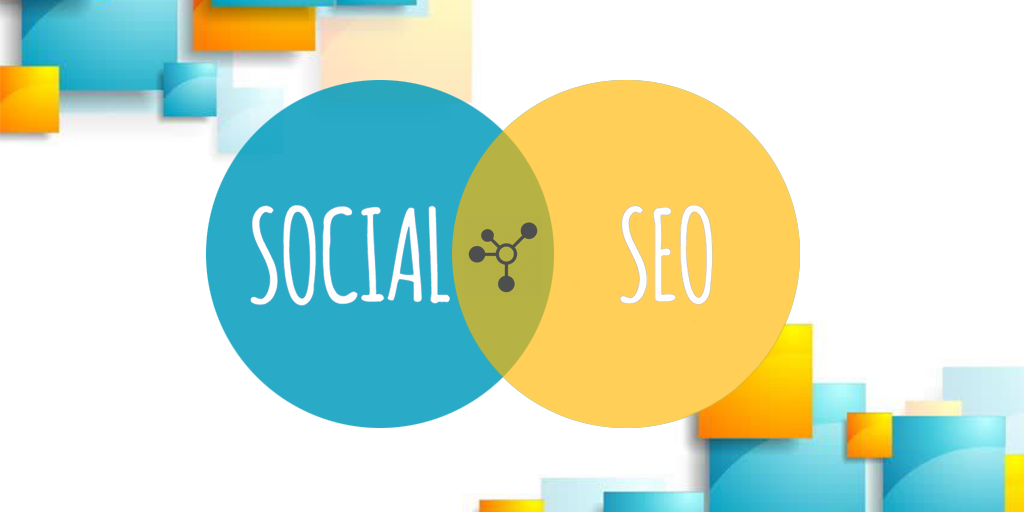
Social SEO is a logical term which elaborates as the use of social media to enhance SEO of your website. In short, the crossover of social media and SEO is known as Social SEO. Not many people are used to how SEO for any site works but everyone majorly knows how social media platform works and how it has the power to make you famous overnight, and that goes with SEO too as everything you share, comment or like on social media is being over watched by the search engines and they are considering these social signals as one important ranking factor for your site.

You can get good rankings by paying no attention at all to social SEO, but you can’t rank your business’s website through social SEO alone. So then why bother with social SEO, if it’s not essential? Because positive social activity around your website makes it easier/faster to rank your site in search engines – directly through the authority that search engines give to Likes, Tweets, and Google +1s, and indirectly through exposing your content to a wider audience, some of whom will link to it from their own sites.

Social SEO isn’t a separate branch of SEO and it won’t soon be replacing traditional SEO, but social signals are becoming increasingly integrated into search engine’s algorithms. Social signals aren’t as important as backlinks, and they won’t be for a long time, if at all, but backlinks aside, social signals are about as important as anything else. Over the course of the last year or two the question is no longer “do social signals have an effect on website rankings?” but rather “how much of an effect are they having?”.

No one has an accurate answer to that question as no search engine has made public that information. But it does a carry weight to rank your website higher and there is no second thought to that. The importance of social SEO has been steadily increasing and is highly likely to continue increasing in importance too.

Things To Consider For Social SEO

Create content that is highly shareable with others,
Make sure it is easy for people to spread your content,
Set-up a company page/account on Facebook, Twitter, and Google+,
Communicate with people through your social media accounts,
Share every piece of knowledge you can, whether it is yours or someone else’s.

If these things are done correctly, you’ll certainly see hike in the following,

Facebook likes and shares your website gets,
People following your Twitter account,
Tweets by authority users that mention your website,
Google +1s your website receives,
Google+ circles you’re in,
Positive reviews left on your Google+ page.

and without any doubt, these positive social signals will increase your search engine rankings for the keywords that your business is targeting.

Keep an eye over your competitor as if your competitor is doing more than building backlinks, then certainly you should start making your social signals stronger as it will give you an added advantage over your competitor. Since now only backlinks aren’t going to give you the world. To rank much higher, you have to keep Social SEO as part of your SEO strategy apart from your traditional SEO.If your competitors aren’t involved socially online then whilst it lessens the need for you to get involved, it presents a good opportunity for you gain an advantage over them.

Hope you had enjoyed this blog post on Social SEO. Keep Reading and Sharing!

Also, have you read about How To Write Articles on LinkedIn Pulse or Promote Your Business On Twitter?

And don’t forget to check our newly launched plugin to take your appointments efficiently Appointment Scheduler Pro.


How To Write Articles on LinkedIn Pulse

LinkedIn Pulse launched as a publishing platform in 2012 by inviting 150 of the most influential thought leaders to write original content. Today, all members can use Pulse to share their unique knowledge and professional insights with the 433+ million members who interact there.

At the same time that it’s exciting, it’s also a bit intimidating, especially for people who doesn’t fall in the category of writers. While you might see the potential to strengthen your brand and build out your profile, you also want to take the right way to do it. The last thing you want is for people to roll their eyes when they see the subject you chose or approach you took.

Well, here’s a step-by-step guide on how to write articles on LinkedIn pulse.

1. Consider The Output Of The Article

First things first, consider why you want to start writing, what’s the big picture behind the scene. It could be possibly because of few reasons including you want to share your professional expertise, expand your network, strengthen your company’s talent brand, interest recruiters who view your profile, or establish yourself as a thought leader?

Once you’ve nailed down the “Why” you can focus on the “Who”. Does your potential audience consist of colleagues or prospective clients? Or are you trying to engage professionals in a specific niche or industry?

To attract followers and be memorable, you’ll want to have a clear message. Pick a coherent thread that runs through the majority of your posts so you’ll become “known” for something (like struggles for new engineers, or tips for freelancing, or best practices for hiring).

2. Stop Thinking Start Writing

In my experience, writing the first draft is by far the hardest part of the process. I have three words of advice: Just start writing. I wish there were a silver bullet. (There isn’t.) Set aside a specific time period—maybe an hour—when you can write without interruption. Schedule it on your calendar and don’t let anything else get in the way.

Here are several questions to help you start brainstorming:

  1. Have a case of writer’s block?
  2. What’s the best career lesson you’ve learned?
  3. What piece of advice would you give to someone hoping to enter your field?
  4. What are the current trends in your industry?
  5. How will your industry look like in the future?
  6. What’s going on in the news? Is there a story or event where you can provide insight?
  7. What experience has most impacted your career?

When you first get started, don’t worry about whether the sentences flow or whether the pieces all fit. No one will ever read your first draft. (It’s OK if it totally sucks—that’s the reason it’s called a rough draft.) What you’re trying to say will get clearer as you go back through a second (and third) time to revise.

Once you think it’s solid, identify someone who’ll give you an honest and constructive evaluation. Ask her what resonated, what didn’t, and what suggestions she’s willing to offer.

Writers are often given cliché advice to write about what they know. While I agree that sharing personal experiences can strengthen a post, I think better advice is to write something that helps people in some way. It doesn’t matter if you’re helping someone become a better marketer, or learn about a new app, or feel less alone because you shared a common experience—the key is asking you asking yourself if this article will make someone else’s day better in any way.

3. First Impression Is The Last Impression

This is an old saying and so true if we consider linkedin pulse. A majority of people who’ll see a glance of your posts will decide whether or not to open it depending on the title and the image of the article.

If you choose something generic and bland, your reader may never get to all of your great insights.

Your headline should be concise, clear, and give people a reason to click. Readers have a short attention span and you need to capture it. Make sure if you are writing for some niche category, the term should be widely searched or at least put an impact on your reader.( “5 Things I Learned from Applying to 30 Jobs in 30 Days” or “Job Application Lessons?” could be some possible titles if you are writing in job hunt niche)

4. Finalize Your Post

With your headline, image, and content complete, you’re ready to finalize your article. Open the LinkedIn homepage and select “Write an article” on your title bar. This will take you to the publishing platform where you can paste in your content.

Double check to make sure the formatting looks right. You can include block quotes, headers, bullet points, videos, and additional images to enhance your article.

If you include links, make sure they direct readers to the appropriate sites. At the bottom of your post, you can include up to three tags to help others find your content. These tags will influence the specific Pulse channels your article will be considered for.

And always do a final check on spelling and grammar. Nothing will sink your otherwise perfect article faster than typos.

5. You Are Good To Go, PUBLISH!

Once you hit publish on your article, here’s what you can expect:

Your original content becomes part of your profile. It is displayed on the Posts section of your profile.

It’s shared with your connections and followers. Your article will be shown in their feed, as a notification, or via email, if they subscribe to daily Pulse emails.

Members not in your network can now follow you from your long-form post to receive updates when you publish next.

Your long-form post is searchable both on and off of LinkedIn.

A small percentage of articles will get featured in Pulse channels. There are dozens of channels based on geography and industry, and a combination of algorithms and editors determine which articles get featured. To reach a larger audience, share your article on other sites and send it directly to colleagues. You spent significant time and effort writing your article, show it off!

How To Increase Your Facebook Page Post Reach

Ques: I have 10,000+ likes on my facebook page, but as soon as I post something on my page, reach comes out to be only 1 or 2 percent of my total fan base. Why does it happen, how to increase your facebook page post reach?

Ans: Facebook’s news feed algorithm does not work to flood the user’s timeline with all the content coming from the pages a user likes. Instead, it depends on how interactive your fan base is with your posts or your content.

So, it is really necessary for us to understand that how facebook news feed works, since if we consider what is happening in the present with all the facebook pages, reaching out to their complete fan base is almost impossible (pages having more than 5k likes).

As Facebook’s Chief Product Officer, Chris Cox, told Time in a 2015 interview:

If you could rate everything that happened on Earth today that was published anywhere by any of your friends, any of your family, any news source…and then pick the 10 that were the most meaningful to know today, that would be a really cool service for us to build. That is really what we aspire to have News Feed become.

According to Facebook, organic reach is defined as how many people you can reach out for free.

When 2012 rolled around, Page managers/owners learned that only a small amount of their Facebook fans — 16% on average– were seeing their Page posts in their News Feeds. And that fraction has only gotten smaller and smaller since.

If you’re going to pay-to-play, get your targeting right. Once you’ve built an audience of relevant fans, focus on advertising the content assets you’ve created — blog posts, ebooks, etc. — and use ads to amplify them to targeted users. Techniques such as browser fingerprinting, though sometimes criticized for privacy reasons, would even allow you to track these targeted users across multiple platforms.  Remember: It’s likely only a matter of time before organic reach hits zero, so you might as well hone your paid strategy now, which brings me to one final recommendation and to our last point of the matter.

A study from Edgerank Checker found that between February 2012 and March 2014, organic reach for an average Facebook Page dropped from 16% to 6.5%. Research from Social@Ogilvy, meanwhile, suggests that for Pages with more than 500,000 Likes, organic reach could be as low as 2%.

If we consider above-stated stats, it will mean that a page with the fan base of 10,000 or more will have an average post reach of around 650 (6.5% of total) or so and if fan base rises up to 1 million, only 20,000 fans will see your post (2% of total).

So, now what’s the solution? Facebook told us to buy the fan base first through page likes ads and then asking us to pay more to interact with them through post reach ads.

As quoted by Facebook’s VP of Advertising Technology, Brian Boland,

No. Our goal is always to provide the best experience for the people that use Facebook. We believe that delivering the best experiences for people also benefits the businesses that use Facebook. If people are more active and engaged with stories that appear in News Feed, they are also more likely to be active and engaged with content from businesses.

Now, when we have understood a little bit about how facebook news feed algorithm is working and how facebook is tackling it, let’s learn how to increase your facebook page post reach.

How To Increase Your Facebook Page Post Reach

1. Be Choosy For What You Post

Marketers have to switch gears from “ untargeted and frequent publishing ” to “ targeted and selective publishing.” The goal is no longer to spray and pray — it’s to get as much interaction from a single post as possible. Each post published to a brand Page can be targeted to a specific audience regardless of whether or not it’s sponsored, which may improve overall interaction with that post among other people who are likely to find it more interesting and relevant.

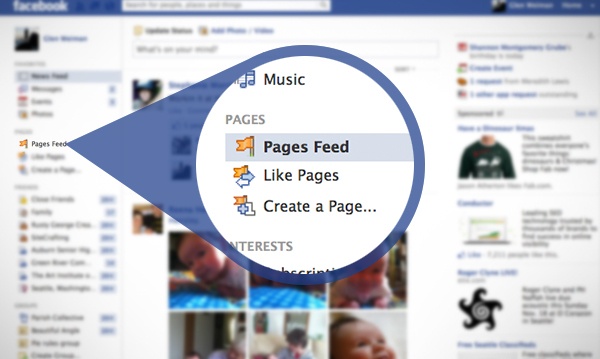
2. Tell your fans to check Page Feeds on the Left Sidebar Of Their Timeline To See Content From Pages They’ve Liked

page-feed-how-to-increase-your-facebook-page-post-reach

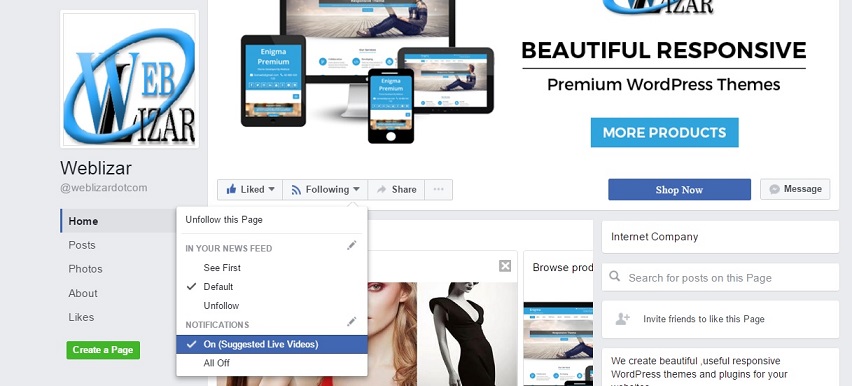
3. Educate Your Superfans That They Can Update Their Notification Settings On Your Page

how-to-increase-your-facebook-page-post-reach

4. Motivate Your Fans To Engage With Your Fans More

This is the toughest part, although giving free goodies or a heavy discount coupon can do the trick here. Many times you must have seen that people opt for polling options to encourage their fans to engage with your page and it’s content.

Sometimes this could be as simple as “ Please Like And Share ” at the end of your posts. But I guess we aren’t that lucky as this trick works for the luckiest of the luckiest lot.

5. Dedicate More Time For Your Owned Assets

Since the only constant with Facebook (and the larger digital media landscape) is change, it’s always safest to focus on the digital channels you entirely own and control — your website and blog. Spend the vast majority of your effort creating content (blog posts and long-form content such as ebooks, case studies, or videos) that will continue to garner inbound traffic, leads, and customers long after they’re first created. If you have time and budget, share those assets to Facebook for additional reach.

6. Facebook Is Now A Paid Ad Platform More Than Social Media Channel – Admit It!

If you’re going to pay-to-play, get your targeting right. Once you’ve built an audience of relevant fans, focus on advertising the content assets you’ve created — blog posts, ebooks, etc. — and use ads to amplify them to targeted users. Remember: It’s likely only a matter of time before organic reach hits zero, so you might as well hone your paid strategy now, which brings me to one final recommendation and to our last point of the matter.

7. Facebook Ads, Go Beyond The Basics

Being a social media platform with more than 1.86 billion users, facebook has sharpened it’s targeting capabilities. Facebook ads are now advanced more than ever with many targeting options for it’s advertisers. Additionally, there are a bunch of tools and features that can help you maximize the effectiveness of your campaigns, including …

Conversion Tracking: Track the actions of site visitors after viewing your Facebook ad.

Custom Audiences: Target Facebook ads based on your email list.

Lookalike Audiences: Target Facebook users similar to your customers.

Audience Insights: Learn about your existing Facebook audience to better target your ads.

Website Custom Audiences: Target Facebook users who have visited your website before.

Facebook Exchange: Place retargeted ads on Facebook for users who’ve visited a certain product or service page on your site.

Lots and Lots of Customizable Reporting: Create reports based on metrics that matter most for your business.

WARNING: Nobody in this world, including me and the genie, can tell you the tactics to achieve 100% post reach to your complete fan base as this way facebook will go out of business and have to rectify other ways of earning. Following steps mentioned in the blog will definitely help you in increasing the post reach but up to an extent.

Hope you had liked this post, Keep reading and Keep sharing!

Read out our first ever meme blog and How To Increase Conversion On Your Website.